Credit Control
The Credit Control panel allows you to create and store escalation policies and templates to send to your tenants.
Credit Control Dashboard
Here you will see any tenancy arrears. You can ‘Choose bulk send template’ or ‘Execute proposed step for (X) tenancies’.
Credit Control - Escalation Policy & Templates
Here you can define a credit control process when rent becomes overdue. Templates can be set up as per your processes. COHO provides an example policy and templates for you, which can be used as is to help you get started, or edited as the basis for your own policies.
Click the settings cog in the top right hand corner of the Credit Control panel to begin adding your templates.
Please also see this YouTube video:
An escalation policy is a set of steps, emails and notifications that an organisation carries out depending on how late (how many days) and how large a tenant’s arrears are. Usually the policy is followed loosely with the credit control manager being given a lot of flexibility to agree repayment plans with tenants.
Show archived templates: Will allow you to see any templates that have been created and archived.
Information Icon: Here COHO provides example policy and templates for you to use and edit. To use the COHO example templates, click the ‘i’.
If your organisation does not already have a policy you can click the button to generate a proposed policy that COHO has put together.
It is paramount that you review each template generated, alter it to fit the style of your organisation, and only send out notifications or actions consistent with your organisation.
COHO DOES NOT take any responsibility for the accuracy or completeness of the proposed policy nor its legal correctness. It is provided purely for demonstrative and educational purposes.
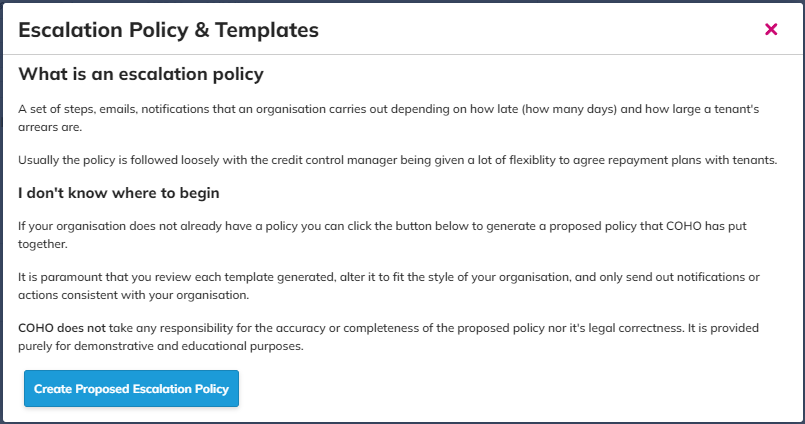
Click ‘Create Proposed Escalation Policy’. This will generate an entire credit control escalation policy with emails and actions to be followed. Once created you can tweak, or remove any templates.
New credit control template
Manual only: A template that will always be sent manually.
Absolute Arrears: Arrears more than X amount and late (aged) by at least Y days. This option will ask for additional information including; Days overdue/late and Arrears greater than.
Relative Arrears: Arrears of more than X weeks/months relative to current rent. This option will ask for additional information including; Rent payment frequency.
Notification Medium: Here options include adding manager notes to manually send the email or set the notification medium as an email.
To: Tenants
Reply To (optional): A reply to email address can be entered.
CC Address(es) (optional): CC email addresses can be added.
Subject of email: Subject or title of the email being sent.
Body of email: This is the main body of the email being sent. You can also the COHO mail merge tags and use additional credit control merge fields.*
Email Attachments: Here you can also include any files you wish to be sent attached to the email.
Blocking step: Checkbox that if checked this template will be proposed unless skipped by a manager.
Name of Template/Trigger: A descriptive name for you and your team to identify the template.
Click 'Create' to create the template, 'Preview' to preview the template or 'Cancel'.
*Additional Credit Control Mail Merge tags include;
[CC:RENT_AMOUNT] = The currently set Rent for the tenancy as shown on the main tenancy page
[CC:DATE_DUE] = The due date of the oldest standing arrears
[CC:DAYS_OVERDUE] = The amount of days since the oldest standing arrears
[CC:AMOUNT_OVERDUE] = The amount in £ overdue
FAQs
Q. What is the difference between 'Manual' and 'Email'?
A. A manual template is instructions for the manager to carry out. An email is an email that will be sent to the tenant.
Manual Example
Email Example: