Sending a Document Through COHO
How To Send Documents To Tenants Via COHO
Learn how to efficiently share important legal or property-related files directly with
your tenants through the Coho platform. We have already seen people issuing Section 13 Notices, Renters Rights Act Prescribed Information Sheets and Credit Control letters via this panel.
This guide simplifies the document management process to ensure your communication remains organized and professional.
This guide simplifies the document management process to ensure your communication remains organized and professional.
1. Navigate to the tenancy you wish to send the document to.
(Or any tenancy if you're sending a document in bulk) and head to the "Communications Panel".
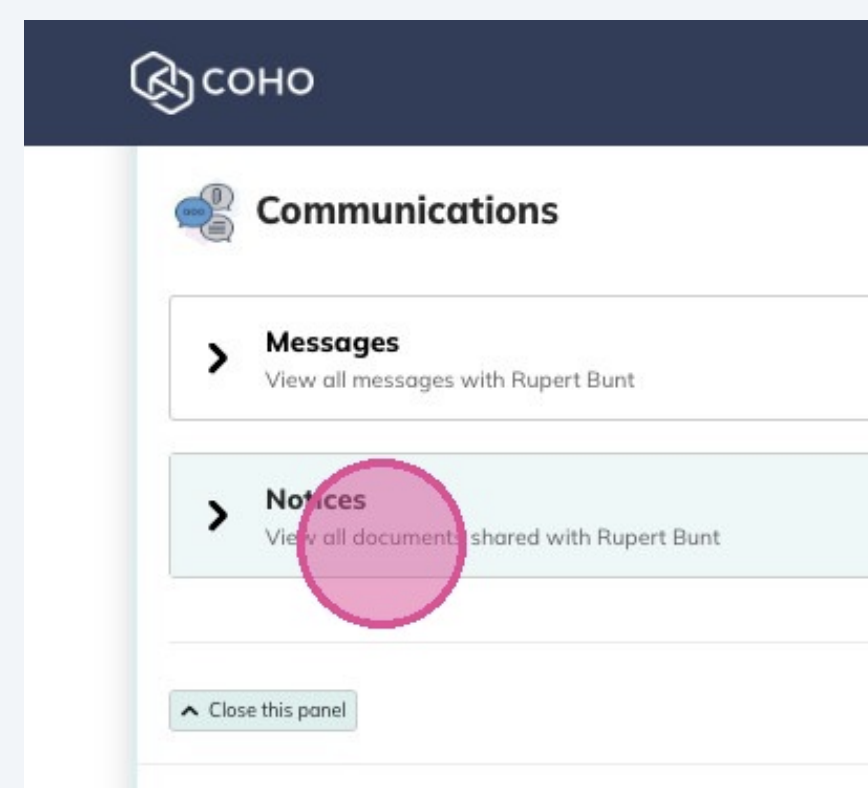
You can then select to send a new document, Select the Recipient(s), Give your File a title and upload your document.
If your tenant has joined COHO you can request acknowledgement from them here. If not they will still be issued the document via email without the option to acknowledge it.
Once the document has been sent, within the "Notices" panel you will be able to see the following:
• Your document "Section 13 Notice - April 2026".
• Your document "Section 13 Notice - April 2026".
• When it was served "7 April 2026"
• How it was served "via email to vannvogstad+txclementine@gmail.com. Available on
their COHO account since 7 April 2026"
• The status of the acknowledgment (if applicable).
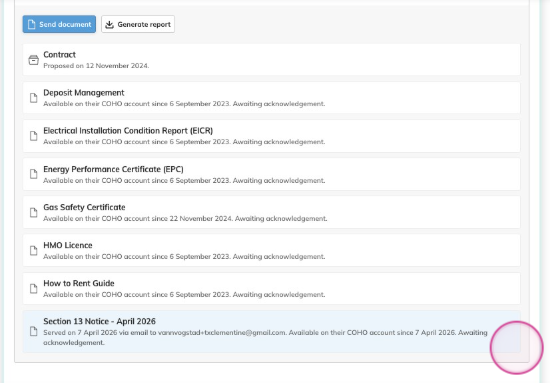
All notices will be sent via email, tenants who have joined COHO will also have them available in their tenancy dashboard where they can view or acknowledge them.
PLEASE NOTE - Notices can not be withdrawn, unsent or deleted.
Related Articles
Using COHO
COHO has been created to be as easy to use as possible. When you log into your account, you default to the main organization page. Organization Level This page has very top level information that includes all properties and all tenants. From your ...COHO Support
Support using COHO Submit a support ticket by Email - support@coho.life Submit a support ticket - Create a Support Ticket Visit our Support Page - Support - This support page offers training resources, online or on-site training and our product FAQs. ...Using COHO Tenancy Agreements
Using COHO’s New Tenancy Agreement Templates This guide explains how to set up and use COHO’s new pre-populated tenancy agreements, which include all the required merge fields and tags. 1. Download COHO’s Pre-Populated Agreement To use the new ...COHO Quick Start Guide
COHO Quick Start Guide You have signed up to COHO or you’re ready to sign up to COHO and you want a little guidance on where to start. Here we have a short guide for getting productive on COHO and other things you should consider. Add a property This ...Tenancy Summary & Information
This article explains how to view and manage tenancy details in COHO, including adding tenancies, updating rent, ending tenancies, and managing tenant information. The tenancy summary and all tenancy information can be found by navigating to any ...